
I set out to build a professional website using AI to do most of the work. That’s efficient, but I wanted the finished site to sound like me, not AI slop.
Slop has two problems, not one. The main points get buried, making the text, well, pointless. Nothing on the page tells you which sentence was supposed to matter. The second problem is separate: the result is soulless, as if no thinking person is behind it. AI makes it easy to publish work you never really authored. I needed better.
So I’ve devised a process that lets AI do much of the work without taking authorship away from me, because I set the standards, review and correct the results, and take responsibility for the outcome. That’s the prime rule: I own every word and pixel. Those standards are ordinary ones: clear, accurate, in my own voice, and worth the time it takes to read. It takes more time to write it, but saving my own time at a reader’s expense is a bad trade, a point Nate B. Jones has made well. Every step in the process below puts that rule into practice.
Create and Correct
The steps all follow the same outline: AI creates a draft, and both AI and I review it, test it, and correct it. Create and Correct (and repeat)! That demands relentless editing on my part: any point that doesn’t sound true to my voice and my vision is revised. The cycle repeats until the result meets both the functional requirements (done by AI, primarily) and my own judgment.
Here’s how I followed this process to create this website.
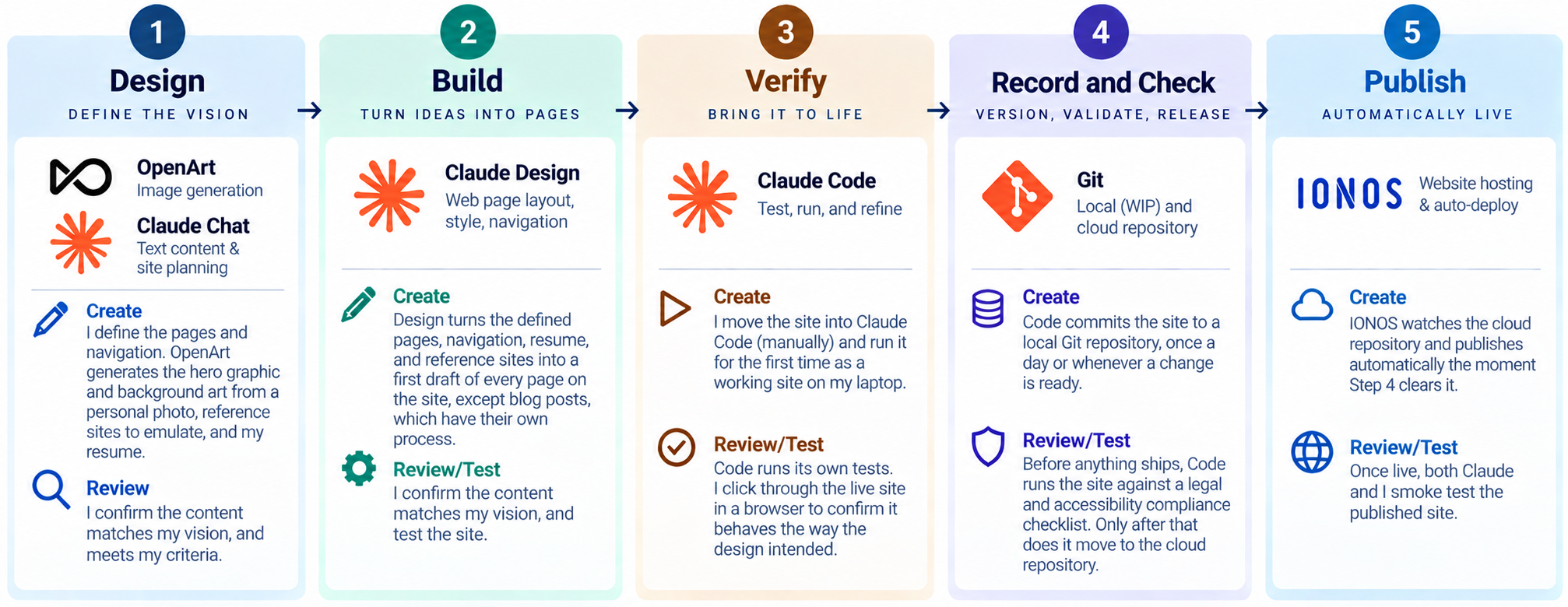
Design
Create
I did a brain dump to feed the initial design specification to Claude Chat. I set the site’s pages, its navigation, the typefaces, and the colors for backgrounds, buttons, and text, along with how buttons should behave, and more. I also included my resume and some reference sites for content and guidance. I used Chat to help engineer a prompt.
Correct
I also asked for Chat to suggest improvements. Repeated cycles of review and correction got it right.
Create
Separately, OpenArt generated the hero graphic and the background art from a personal photo, a couple of reference sites, and my resume.
Correct
Again, I reviewed the graphic and went through a few improvement cycles until I liked it.
Build
Create
Using the prompt from Chat, Claude Design created the first draft of the website (except the blog posts, which follow their own process. I’ll cover that in a later post.) Design built the site very quickly, proving the efficiency. But I’m an amateur website designer, so it was ugly!
Correct
Fortunately, I could make rapid changes by command to Design. The first revisions were also efficient, as I could change all buttons with a single command, or all background colors, etc. However, as changes became smaller tweaks, the command approach became less efficient. It took a lot of words to describe exactly what needed to be changed. (Design does have the ability to let you edit the website in the presentation pane, which would have been better, but I could not get it to work.)
Both Design and I tested the website to make sure the pages worked correctly, although a few elements (for example, mailto:) don’t work in Design, a limitation of the tool.
I continued cycling with changes and further review until I liked the website.
Verify
Create
All features work in Claude Code, so a full test is possible there. Code creates an internal URL on your laptop. One thing about the transition from Claude Design to Claude Code—it’s manual. It wasn’t hard, though. At my request, Design created a zip file with the web files, and I uploaded the zip to Code. Moving to Code also set up the rest of the development process, as all of the remaining steps are executed from Code.
Correct
Code tests the site with browsers, and I ran my own tests as well. Early on, I tested thoroughly to confirm the testing done by Code, but as I progressed through several versions of the website, my testing focused more on look-and-feel testing, again serving as a check that this site was matching my voice and vision.
One additional point on the Verify step. If this process were adapted to a more complex website requiring real coding, that work could be done here. So the process is expandable.
Record and Check
Create
Each day, at least, I have Code save the work in progress to the Git repository on my laptop. This saves the work and provides a fallback in case I want to revert to an earlier version.
Once the site is ready to release, I have Claude push it to the local repository a final time, and then to the Git cloud repository.
Correct
Once I have a version that is ready to release, and before the site goes to the Git cloud repository, I have Claude Code check the site against a compliance standard. I adapted a comprehensive compliance standard I had developed for another software project, covering the major legal and regulatory requirements for software across multiple jurisdictions. I built the relevant requirements into a Claude skill that Code uses to check this site before release. While the check considers a broad range of laws and standards, the primary check for this site is accessibility as defined by the Americans with Disabilities Act (ADA).
Publish
Create
Publishing itself is automatic. The moment the site reaches the cloud repository, IONOS captures the change and installs it in the live website it hosts.
Correct
Both Claude and I test the published site once it’s there.
Automate, But Keep Authorship
By creating a workflow process with repeating create and correction cycles, I can make AI do much of the work while I keep authorship and ownership of the outcome. It doesn’t matter how many or which AI tools are used. Those will constantly change. But the one rule is constant.
Sources
- “How to use AI to understand and improve your writing: Nine prompts that go beyond ‘write this for me’” — Nate B. Jones, Substack
- “Nobody Checked Deloitte’s Report. One Academic Did. It Cost Them A$97,587” — Nate B. Jones, Substack
- “How to Write with AI Without Losing Your Voice” — The Virtual Training Team
- “How to Use AI Writing Tools Without Sounding Robotic” — AIWritingStack
- “How To Write Without Sounding Like AI” — George Kao